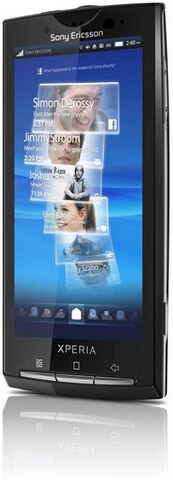
Almost 2 years of getting stuck with a regular mobile phone, I finally decided to replace my mobile phone with a smartphone (others call it as mobile internet device.)
Convinced for the early part of the year to buy Satio because of it's digicam features, I was almost convinced to buy it at the start of June. While waiting for the price to go down a little bit , I saw the
Xperia X10i displayed at an Electronic Shop near my workplace. Sorry Satio, but the Android is much better.
The sad part though is, it broke my piggy bank just to take the
Xperia X10i home.
That said, here's a brief review of my
Xperia X10i.
Updates:
Androd 2.1 Eclair Upgrade Finally Coming To Sony Ericsson Xperia X10
Xperia X10i Review Part 2 : More More More More Apps...
Inside the box
- charger and USB cable (cable can be attached and detached from the charger)
- 8GB microSD card
- MW600 Bluetooth stereo headset
- 3.5 mm stereo headset Super Bass
- leather case
Interface
Android OS 1.6 is very user friendly with it's icons. Navigating through programs, settings, creating a mms, connecting through wireless networks is just like you are turning page by page. I read some articles about the new releases of the OS itself. Android 2.1 and 2.2 respectively and I can't wait for the release of this new OS for
Xperia X10i to see the much and improved Android.
Functionality
Very much satisfied with navigating using your fingertip from home to adding widgets either side of the home menu when you are not using Timescape as your home screen. Response to every touch is sensitive so there's an action in every touch from the screen either in menu or inputting text.
Sony Ericsson Apps
Mediascape and Timescape is very awesome application. Mediascape is used to organize all you audio, video and photos while Timescape is an app which shows updates from Facebook, Twitter, Email Account, SMS, MMS, Photos Taken, Call logs, Music and Videos.
There's a Gmail and Gtalk installed also which makes sense because the platform is Google. Moxier Apps is an app that lets you connect to a Microsoft Exchange Email Account, Calendar and Contacts.
OfficeSuite is an app to let you view Document, Spreadsheets and Portable Document Files or pdf.
Youtube and Google Maps app of which there is no need to elaborate on.
And the most commonly used by persons who has trouble of waking up early in the morning the ALARM CLOCK.
Android Market
Browse for free and paid applications at the Android Market for apps suited for your
X10i. Best place to get for apps is slideme.org.
Installing apps is completely easy, just download and install and the app is now ready to use.
One of my favorite app the YXFLash which will play avi files and no need to convert to mp4 format.
For chat app, just go to Nimbuzz.com and download the program for the Android.
Battery life
Last up to 2 days when it's used only as a ordinary phone to receive calls and messages Up to 5 hours of battery life when playing music or video, using Timescape and Mediascape which is the featured applications for Xperia X10i. Optimization of battery comes by disabling unused applications, turning off the wireless connectivity using only GSM .
Browsing
Browsing is very simple and fast using the browser by SE but you can still download other browser for X10i at Android Market.
Camera
Good quality of pictures at 8MP but there's no xenon flash but there's a substitute for the flash which is the photo light.
Security
There are four levels of security to prevent unauthorized physical access to your phone. One is do not lend your
X10, the second one is screen timeout lock which is just follow the unlock pattern, the third one is the pattern lock which can be seen at the picture.
Pattern lock can be configured at the settings. And last but not the least is the SIM card lock.
I haven't figured out how to browse the Internet using GPRS settings. The cellular company already sent the configuration but it's not working hopefully will figure it out after few more use of my favorite search engine .
So thats it for now and more reviews to come once
Android 2.1 arrives.
Update: Xperia X10i Review Part 2 : More More More More Apps...