Spiga

Showing posts with label Review. Show all posts

My Encounter With The iPad

Just 'received' an iPad--specifically the 32Gb with 3G version--for review. If you're reading this, then you're probably still wondering whether you should dole out $499 or more for this piece of Apple ingenuity.

In my brief encounter with the iPad, I hope to tell you my impressions on the iPad. After reading this, I hope you'll have a better idea of what the iPad brings to the table and if you should make the decision to purchase one. Comments for this article are most welcome!

I. First-hand Impressions.

The iPad is sleek and beautiful to look at and touch. The interface was fast and responsive as usual with no lag and applications opened seamlessly.

The display is something to behold. With a resolution of 1024X768, the interface, pictures, videos, everything looks sharp and colorful. Even in direct sunlight and a good amount of shadows and reflections, the iPad's display did quite OK especially when viewing an image or video with bright colors.

In the 7 days that I messed around with the iPad, playing games and videos, reading some Hardy Boys e-books, so far the 7-inch display hasn't strained my eyes, but my hands have been from all the zooming in and out.

The audio quality on the iPad though was kinda, how should I say it... no oomph! It's loud enough to hear in a quiet environment, but, even in maximum speaker volume, the sound begins to lose steam in a semi-noisy environment. The sound was awesome on my Nokia Bluetooth headset though! Of course, the iPad also has a 3.5" audio connector for use with wired headphones. If you begin to experience ear strain, use a speaker dock or amplified speakers for maximum sound output.

The iPad is light at 1.5lbs to 1.6lbs (3G) or more than half of a kilogram. It get's heavier after about 15 minutes of firmly holding it... or was that my hand just tiring out? ^^,

With the iPad, nothing feels cheap. Of course, it doesn't come cheap either.

II. What I Disliked about the iPad

What's not to like about the Apple iPad? For first impressions, it's almost perfect. But up close and personal? No, not really.

For starters, Apple boasts 250,000 apps on its app store. I found out though that only .04 percent of that is actually compatible with the 7-inch screen. Don't get me wrong, all of those free and paid 250,000 apps work on the iPad--it's just that they were either made for the iPhone or iPod so the screen size for most of the apps are the same as the iPhone and iPod. The iPad does provide a zoom feature but by the time the app fills the screen, the app gets so pixelized, you'll feel like you traveled in time to the days of  playing Super Mario on the NES. I didn't enjoy playing Angry Birds on the iPad.

Another thing which I found lacking--and I think most people would agree with me on this--is the lack of a front facing camera. For all the vanity that goes with the iPad, a camera should have been included to flaunt it even more! Rumor is though, that Apple is going to include a camera in it's next iteration of the iPad.

No Adobe Flash. Having Adobe Flash on the iPad or on all Apple products is very important because much of the Internet's rich media like online streaming, graphics, and even whole websites, is encoded in Adobe Flash. When I switched to the PC to watch my favorite TV shows on OnlineReplays, I totally forgot about the iPad until the following day. For such a media-centric device, not supporting Adobe Flash was pure disappointment.

I also still can't connect to my company email too. It's weird that I can configure Outlook Web Access on an iPhone yet fail on the iPad. If you have a solution on how to configure Outlook Web Access on the iPad, I would appreciate it very much.

III. What I Liked about the iPad.

I was totally impressed with the long battery life of the iPad. Even with WiFi continuously on, audio blaring on the built-in speakers, chatting, browsing, and gaming, the battery lasted for days . The Mobily micro-SIM was not yet activated prior to this writing so I didn't have the chance to test out the 3G but I guess with the Wifi continuously on, it was enough to gauge battery life.

As much as I disliked that only .04% of apps at the Apple store were for the iPhone or iPod and of which half were probably junk, there were some jewels among the rubbish--and I was just skimming the surface of apps. Apps will make or break the iPad. Here are my top five.

1. VLC Player
It's the saving grace of watching videos on the iPad. I'm pretty sure you know what I mean. You've got all of these movies and TV shows saved on your hard drive but find out you have to convert them to the .mov format first before you can watch them on your iPad. Not anymore with the VLC Player. Just copy the file into your iPad and watch away.

2. RSS Readers and Newspaper Feeds
For bloggers who need to stay updated on current events, RSS Readers and Newspaper feeds are a must. That is why a lot of app developers have taken advantage of the capabilities of the iPad and have created a lot of them. They all work the same, while others have some special features.

3. Team Viewer
With more than a 100 million users, TeamViewer connects to any PC or server around the world within a few seconds. I can remote control my PC at home or provide technical support using the Team Viewer app.

4. iBooks
All my life, I've loved reading books. There's a different sensation when your brain translates words and stories into images and scenes in your mind. The iPad fits the bill, and like I said earlier, the iPad is easy on the eyes so reading is a blast on the iPad. The Kindle (If you can't beat 'em, join 'em) app works similarly to iBooks, but has a direct access to Amazon, wherein thousands of books can be bought and downloaded for reading on the iPad.

5. Dropbox
Do you constantly forget your USB at home. I sure do and it gets frustrating. Fortunately there's Dropbox, a service that uses the cloud to enable its users to store and share files and folders across the Internet using file synchronization. And it works like a normal folder. Just copy the file into the Dropbox folder and that file becomes accessible to you or to others you share it with anywhere with an Internet connection.

Of course, the apps are what defines the iPad so it is up to you which apps you want installed. If you want more reviews on iPad apps, TechRadar provided their top 130 HERE.

IV. Conclusion:

The hardware, as is with most Apple devices, is manufactured to perfection. Albeit with the iPad, I think Steve Jobs and the Apple team could have done more with the operating system like support Adobe Flash.

So, do I like the iPad? Yes. Do I want an iPad? Yes. Will I buy an iPad? No. Do I have the money to buy an iPad? Yes. And still I won't buy it. Why? iPad 2.

Swype.. It's Time To Swipe And Stop Tapping..

I woke up late in the morning, my very technogoogler friend popped a buzz and message on my screen for a new review for my Sony Ericsson Xperia X10i and for the sake of my fellow Android users. Here's my review about Swype, a new input software for Android which allows the user to swipe as a way to inputting text, keys and symbols when composing SMS, Emails, making posts and comments in Social Networking Sites or even typing an URL over the traditional way of inputting on touch screen devices. Kudos to the developer of this app, it's fun to play and use it.

Fring Two-Way Video Call Now On The Android

If you've never heard of Fring before, well it is a FREE mobile application that works much the same as any chat application for mobiles--except for one feature. Fring can make two-way video calls and it works on the Skype network--although it should work with other video chatting services like GTalk and Yahoo Messenger among others.

Xperia X10i Review Part 2 : More More More More Apps...

Update: Androd 2.1 Eclair Upgrade Finally Coming To Sony Ericsson Xperia X10

After two weeks of googling, torrents or using slideme.org for apps for my Xperia X10i. Here's the apps that I've installed. For apps site, visit slideme.org or android.com/market/ using the phone connection either (GPRS or WiFi) then download the client for your X10i. But it is more convenient to use a computer to get the URL for the app maker then download it from there.

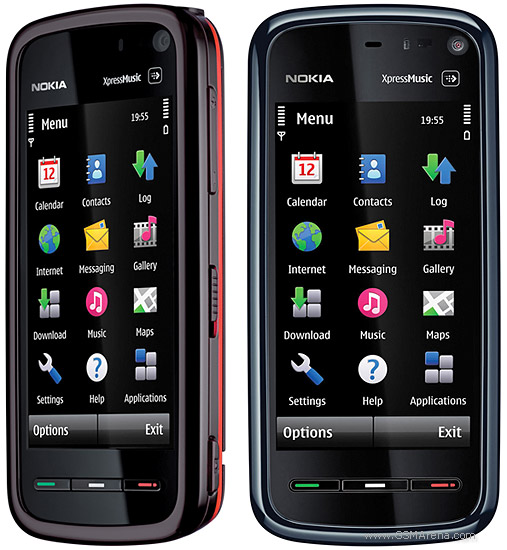
Nokia 5800 XpressMusic Review

I finally got around to replacing my old Phone, an HTC Trinity, with the Nokia 5800. There are two varieties of this phone, the Navigation Edition and the XpressMusic which I got. Both phones are practically the same in features, except that the Navigation Edition is more inclined towards maps.


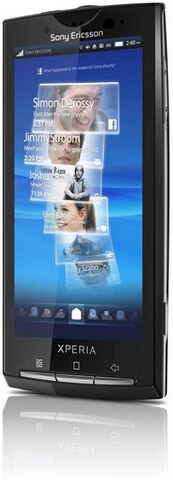
Sony Ericsson Xperia X10i

Almost 2 years of getting stuck with a regular mobile phone, I finally decided to replace my mobile phone with a smartphone (others call it as mobile internet device.)

Convinced for the early part of the year to buy Satio because of it's digicam features, I was almost convinced to buy it at the start of June. While waiting for the price to go down a little bit , I saw the Xperia X10i displayed at an Electronic Shop near my workplace. Sorry Satio, but the Android is much better.

The sad part though is, it broke my piggy bank just to take the Xperia X10i home.

That said, here's a brief review of my Xperia X10i.
Updates:  
Androd 2.1 Eclair Upgrade Finally Coming To Sony Ericsson Xperia X10
Xperia X10i Review Part 2 : More More More More Apps...

Inside the box
- charger and USB cable (cable can be attached and detached from the charger)
- 8GB microSD card
- MW600 Bluetooth stereo headset
- 3.5 mm stereo headset Super Bass
- leather case

Interface
Android OS 1.6 is very user friendly with it's icons. Navigating through programs, settings, creating a mms, connecting through wireless networks is just like you are turning page by page. I read some articles about the new releases of the OS itself. Android 2.1 and 2.2 respectively and I can't wait for the release of this new OS for Xperia X10i to see the much and improved Android.

Functionality
Very much satisfied with navigating using your fingertip from home to adding widgets either side of the home menu when you are not using Timescape as your home screen. Response to every touch is sensitive so there's an action in every touch from the screen either in menu or inputting text.

Sony Ericsson Apps
Mediascape and Timescape is very awesome application. Mediascape is used to organize all you audio, video and photos while Timescape is an app which shows updates from Facebook, Twitter, Email Account, SMS, MMS, Photos Taken, Call logs, Music and Videos.

There's a Gmail and Gtalk installed also which makes sense because the platform is Google. Moxier Apps is an app that lets you connect to a Microsoft Exchange Email Account, Calendar and Contacts.

OfficeSuite is an app to let you view Document, Spreadsheets and Portable Document Files or pdf.

Youtube and Google Maps app of which there is no need to elaborate on.

And the most commonly used by persons who has trouble of waking up early in the morning the ALARM CLOCK.

Android Market
Browse for free and paid applications at the Android Market for apps suited for your X10i. Best place to get for apps is slideme.org.

Installing apps is completely easy, just download and install and the app is now ready to use.

One of my favorite app the YXFLash which will play avi files and no need to convert to mp4 format.

For chat app, just go to Nimbuzz.com and download the program for the Android.


Battery life
Last up to 2 days when it's used only as a ordinary phone to receive calls and messages Up to 5 hours of battery life when playing music or video, using Timescape and Mediascape which is the featured applications for Xperia X10i. Optimization of battery comes by disabling unused applications, turning off the wireless connectivity using only GSM .

Browsing
Browsing is very simple and fast using the browser by SE but you can still download other browser for X10i at Android Market.

Camera
Good quality of pictures at 8MP but there's no xenon flash but there's a substitute for the flash which is the photo light.
Security
There are four levels of security to prevent unauthorized physical access to your phone. One is do not lend your X10, the second one is screen timeout lock which is just follow the unlock pattern, the third one is the pattern lock which can be seen at the picture.

Pattern lock can be configured at the settings. And last but not the least is the SIM card lock.

I haven't figured out how to browse the Internet using GPRS settings. The cellular company already sent the configuration but it's not working hopefully will figure it out after few more use of my favorite search engine .

So thats it for now and more reviews to come once Android 2.1 arrives.


Update: Xperia X10i Review Part 2 : More More More More Apps...

Because I'm The Mom

As kids, we may have heard the words "Get up now!" "Brush your teeth." Tie Your Shoes." "I'll count to three." and a lot more and if you were stubborn enough to ask why, 90% of the time, you'd get the answer, "Because I said so!" or "Because I'm the Mom!" And my mom was THE mom. As kids, we think its silly what our moms make us do, and yet as we grow up we realize it was all for our own good. So, in the spirit of Mother's Day, here's all those words in this song. Enjoy reminiscing! ^^,

2 Terrabyte Hard Disk Drive

2 Terrabytes of Hard Disk space? What the heck am I gonna put in there?! I asked that same question back when 80Gb was still fairly new. I now have at least 4 500Gb Hard Drives full of data and I had to store some more in external hard drives. I'm sure a lot of you guys out there have more and it's good to know that the Hard Drive Manufacturers are still pushing the limits. For a good review on the new 2 Tb HDD's check this out: Hot Hardware